Showing posts with label PC Software. Show all posts

Monday, July 20, 2009

iPhone RingToneMaker v2.5

iPhone RingToneMaker v2.5

One of the biggest iPhone complaints is the desire to have custom iPhone Ringtones. iPhoneRingToneMaker solves this by letting you create your own ringtones from the .MP3 files in your music library. It then automatically transfers them to iTunes or your iPhone such that you hear these fantastic ringtones when your acquaintances call you. Think of iPhoneRingToneMaker as your ultimate Apple iPhone accessory.


iPhoneRingToneMaker works with the iPhone 2.5 and iTune 7.7 updates .
If you are running an older version of iPhoneRingToneMaker and you don't hear your ringtones, this new version is for you.
Phone Ringtone Maker lets you create your own ringtones from the .mp3, .wav, .ogg music files in you library. And transfer them to your iPhone automatically such that you hear these fantastic ringtones when your acquaintances call you.

The iPhone is the Device of the year. The Apple mobile phone has been really successful and it is difficult to find a person who is not looking forward to have one in his pocket.

iPhone offers lots of features, it&39;s more than an iPod, it offers multimedia capabilities, games, agenda, and, of course a mobile phone.

What is a trendy mobile phone without a trendy ringtone? That is the reason of iPhone Ringtone Maker, an easy-to-use and intuitive program that allows you to create your own ringtones for your iPhone.

It supports mp3, wav and ogg files. Choose your favorite song and it will appear on a line, then you only have to choose the part of the song you like the most by dragging the limits. If you want you can add some cool effects to your ringtones. When you will have finished your creation, just save the selection and use iTunes to transfer the ringtone to your iPhone.

Features:

- Super easy and intuitive user interface
- Automatically transfers your custom ringtones into your iPhone
- .MP3, .WAV, .OGG Support
- Fade In and Fade Out your ringtones
- And cool sound effects to your ringtones
- Create ringtones with accuracy up to a hundredth of a second
- Use songs purchased from iTunes(xp only)

Download:


If you enjoyed this post, make sure you subscribe to my RSS feed!

Read rest of entry

Friday, July 17, 2009

How to Rip DVD and Convert Video for Blackberry

“Blackberry is a line of wireless handheld devices that was introduced in 1999 as a two-way pager. In 2002, the more commonly known smartphone Blackberry was released, which supports push e-mail, mobile telephone, text messaging, internet faxing, web browsing and other wireless information services as well as a multi-touch interface.”

In daily life, people not only regard it as a phone to communicate, but also a multimedia to enjoy songs and videos. How to put dvd and video on Blackberry? This is a tough question for some people. They have interest to get the answer, but not all the people do.
If you have such a chance to read my article, you will have an opportunity to enjoy dvds and videos on your Blackberry.

In the following text, I will explain the process into two parts:
1. How to put dvd on Blackberry
2. How to put video on Blackberry

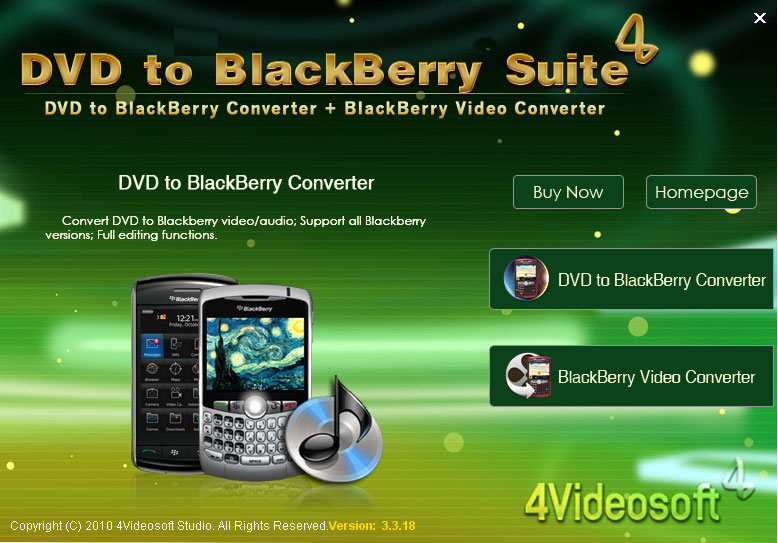
To complete this process, I need a tool called 4Videosoft DVD to Blackberry Suite


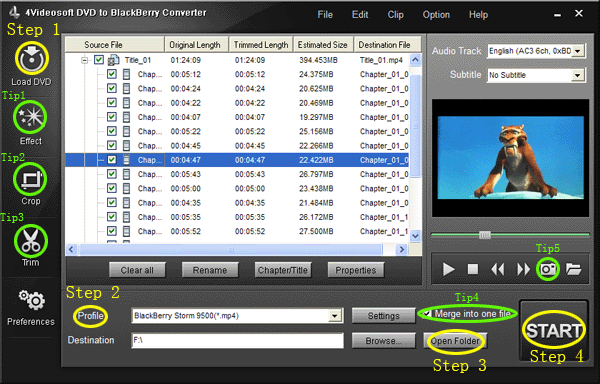
Part 1: How to put dvd on Blackberry with DVD to Blackberry Converter
Step 0: Download and install 4Videosoft DVD to Blackberry Converter


Step 1: Import DVD.
Place the DVD into your DVD drive and click the “Load DVD” button to load DVD.

Step 2: Video settings.
Select the output video format you want from the “Profile” drop-down list.

Step 3: Place video
Click “Open Folder” button to open your output destination file.

Step 4: Start conversion
Click the “Start” button to start your conversion and in a short while it will be finished.

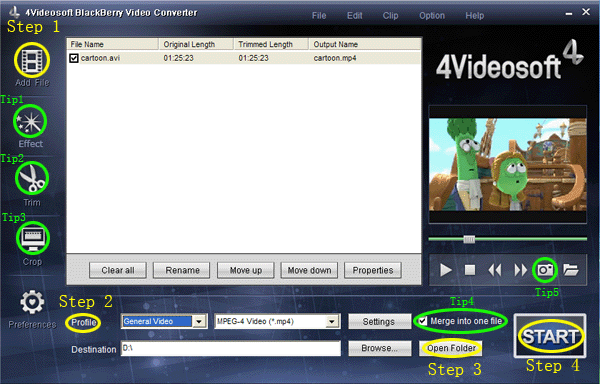
Part 2: How to put video on Blackberry with BlackBerry Video Converter

Step 0: Download and install 4Videosoft Blackberry Video Converter
When you finished the download process, run the .exe file to install it.

Step 1: Click “Add files” button to import videos.

Step 2: Extend the "Profile" category to select an output format.

Step 3: Click “Open Folder” button to open your output destination file.

Step 4: Click the “Start” to convert.

Tips----- Basic functions for all the 4videosof:

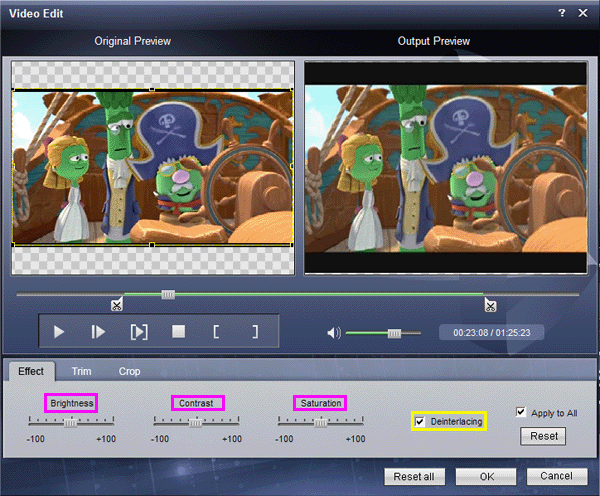
1. How to change your video effect
If you want to adjust the effect of your movie, please click the “Effect” button and a pop-up effect window will appear. It allows you to edit your movie’s effect including “Brightness, Contrast, Saturation and Volume”.


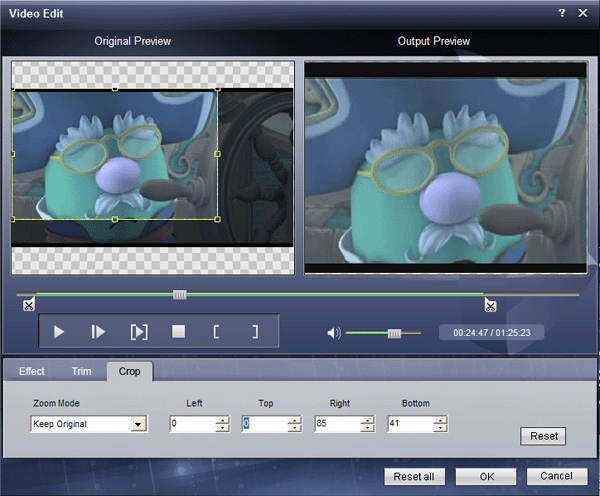
2: How to crop off the black edges and adjust the size of video play region
By using the "Crop" function you can crop off the black edge of your video and you can also drag the line around the video image to adjust the video play region to fit for your mobile devices


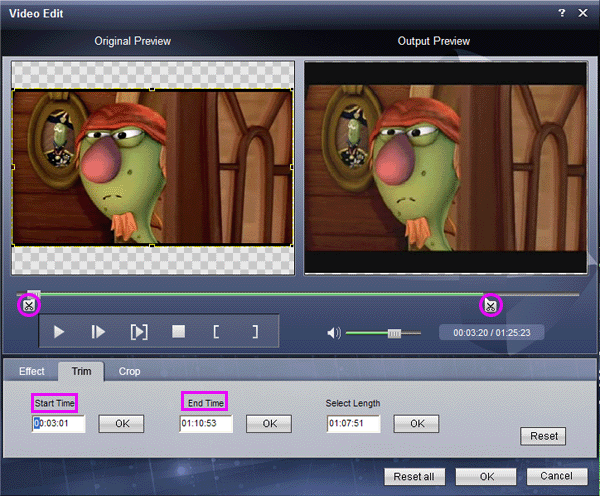
3: How to split your video
The "Trim" function also servers as a video splitter for you to get any time-length video episode. You can set the "Start Time" and "End Time" to set the exact time-length of the clip or you can directly drag the slide bar to the position you want.

4: How to join the videos
If you would like to put several files into one output file, please tick the check box of the “Merge into one file”.

5: How to save your favorite picture
If you like the current image when preview video, you can use the "Snapshot" option. Just click the "Snapshot" button, the image will be saved and you can click the "Open" button next to "Snapshot" button to open your picture.

By the way, I also find useful tools for sony fans to enjoy videos on their players.
PS3 Video Converter
Walkman Video Converter
Sony XPERIA Video Converter


If you enjoyed this post, make sure you subscribe to my RSS feed!

Read rest of entry

Sunday, July 5, 2009

Unlimited Free Calls From Pc To Mobile..

Only for this countrys:

* Argentina free*
* Australia free*
* Austria free*
* Belgium free*
* Canada free*
* Czech Republic free*
* Denmark free*
* France free*
* Germany free*
* Hong Kong (+mobile) free*
* Hungary free*
* Ireland free*
* Italy free*
* Luxembourg free*
* Malaysia free*
* Netherlands free*
* New Zealand free*
* Norway free*
* Poland free*
* Portugal free*
* Puerto Rico (+mobile) free*
* Russian Federation [moscow] free*
* Russian Federation [st Petersburg] free*
* Singapore free*
* Slovenia free*
* Spain free*
* Sweden free*
* Switzerland free*
* Taiwan free*
* United Kingdom free*
* United States (+mobile) free*


(Note:If its says No free Calls Then Reinstall the Software and Restart Ur Pc and U will get free calls again)

Enjoy The Calling..............


http://uploading.com/files/C47MPC5H/Unlimited_Free_Calls_From_PC_To_Mobile_Free.rar.html


OR


http://hotfile.com/dl/6776256/2a176e1/Unlimited_Free_Calls_From_PC_To_Mobile_Free.rar.html
Read rest of entry

Thursday, July 2, 2009

MP3 To Ringtone Gold 5.03 Full

MP3 To Ringtone Gold 5.03 Full


OS: Win32 |Size: 6.26MB


MP3 To Ringtone Gold is an ringtone converter. It can be used to convert the popular compressed audio formats (.mp3) to ringtone format(.mmf,.amr,.mp3,.wav, .mid) and send them to your cell phone. It can be used to rip multiple audio CDs at once .It also can be used as a mp3 resizer for your mp3 mobile phone.You can save any part of your favorite mp3s to ringtone format. 64MB mp3 mobile phone can support more than 60 songs.Simply drag and drop the songs you want onto the main screen.
You can edit your ringtones now!


Download

http://rapidshare.com/files/21216400/mp3ring.rar


Password:

kroto


Custom Search

Read rest of entry

Tuesday, June 30, 2009

Memory Card Recovery V3.60.1012

Memory Card Recovery V3.60.1012

Recover deleted photo, audio/video, MP3, MP4 from memory cards

Supported Storage:

CompactFlash Card, CF Card
Memory Stick, Memory Stick Duo, Memory Stick Pro, Memory Stick Pro Duo
Secure Digital Card, SD Card, miniSD
MultiMedia Card, MMC Card
SmartMedia, SM Card
xD Picture Card
Micro Drive
Cellular Phone, PDA and MP3/MP4 Player
Floppy Disk, Zip Disk and more.

Features

- Recover deleted photos from memory cards
- Recover lost photos from memory cards
- Recover photos from formatted memory cards
- Recover photos from damaged, unreadable or defective memory cards
- Recover photos from removable storage including floppy disks, Zip disks etc.
- Recover photo, audio/video, MP3, MP4 files from cellular phones, MP3 players, PDAs etc.


Supported Situations


- Photos deleted accidentally from memory cards
- Photos loss due to formatting or "Delete All"
- Corruption due to the card being pulled out while your camera is on
- Damage due to turning your camera off during a write process
- Data corruption due to critical areas damage e.g. FAT, ROOT, BOOT area damage
- Data loss due to using between different cameras/computers/devices
- Other events that could cause damage to data


CODE
Read rest of entry

China Mobile PC Suite

China Mobile PC Suite

Here Is A PC Suite For China Mobiles...

Enjoy...


Read rest of entry
 

Subscriber Links & Rank

Computers Top Blogs Subscribe

Mobile Phone Tricks Copyright © 2009 Gadget Blog is Designed by Manish Nishad Sponsored by Online Business Journal